
How to Cash Out Your BIGO LIVE Earnings
Creators on BIGO LIVE can convert eligible earnings received through virtual gifts into real money, subject to BIGO LIVE’s current policies, minimum withdrawal requirements, and payment procedures.How to Cash Out Your Earnings
Step 1: Open Your Profile
Tap on your profile and access your Wallet section.
Step 2: Review Your Available Earnings
Check your current balance and verify that you meet BIGO LIVE’s minimum withdrawal requirements.
Step 3: Add or Verify Your Payment Method
Make sure your payment information is accurate and up to date before submitting a withdrawal request.
Step 4: Submit Your Withdrawal Request
Follow the instructions within the app to request a payout of your eligible earnings.
Step 5: Receive Your Payment
Once approved and processed by BIGO LIVE, funds will be sent to your selected payment method. Processing times may vary depending on your location and payment provider.
Important Notes
✓ Withdrawal requirements and payout methods may vary by country and region.
✓ BIGO LIVE may update withdrawal limits, processing times, and payment options from time to time.
✓ Always review the latest information within the BIGO LIVE app before submitting a withdrawal request.
If you have questions about your earnings or withdrawals, please contact BIGO LIVE Support directly through the app.
Frequently Asked Questions
What Are BIGO Beans?
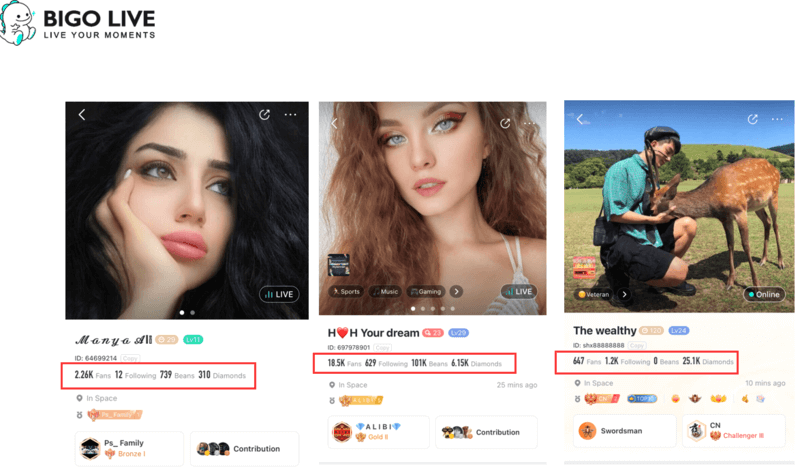
BIGO Beans are the platform’s creator rewards currency. Creators receive beans when viewers send virtual gifts during livestreams.
Eligible beans can later be converted into earnings according to BIGO LIVE’s current payout policies and withdrawal requirements.
What’s the Difference Between Beans and Diamonds?
Diamonds
✓ Purchased by users within the BIGO LIVE app.
✓ Used to send virtual gifts to creators.
Beans
✓ Earned by creators when they receive virtual gifts.
✓ Can be converted into eligible earnings through BIGO LIVE’s payout system.
✓ Cannot be purchased directly.
In simple terms, viewers use Diamonds to send gifts, while creators receive Beans from those gifts.
How Do I Check My Bean Balance?
Open the BIGO LIVE app.
Go to your Profile.
Tap Wallet.
Select Beans to view your current balance and earnings information.
How Can I Withdraw My Earnings?
Once you meet BIGO LIVE’s current withdrawal requirements, you can submit a withdrawal request through the app.
Depending on your region and account settings, payout options may include:
✓ Bank Account Transfer
✓ Payoneer
✓ Other payment methods supported by BIGO LIVE
Available withdrawal methods, processing times, and minimum withdrawal amounts may vary by country and are subject to BIGO LIVE’s current policies.
Important
Withdrawal requirements, exchange rates, and payment methods may change over time. Always refer to the latest information available within the BIGO LIVE app before submitting a withdrawal request.
How to Add a Withdrawal Method
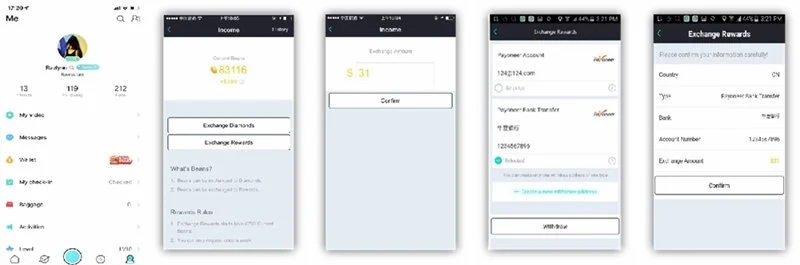
Step 1: Open BIGO LIVE and tap your Profile icon.
Step 2: Navigate to Wallet → Beans → Exchange Rewards.
Step 3: Select Create New Address and choose your country or region.
Step 4: Choose your preferred withdrawal method, such as Bank Account or Payoneer (availability may vary by region).
Step 5: Enter your personal and payment information carefully, ensuring all details are accurate.
Step 6: Submit your information and wait for approval before requesting a withdrawal.
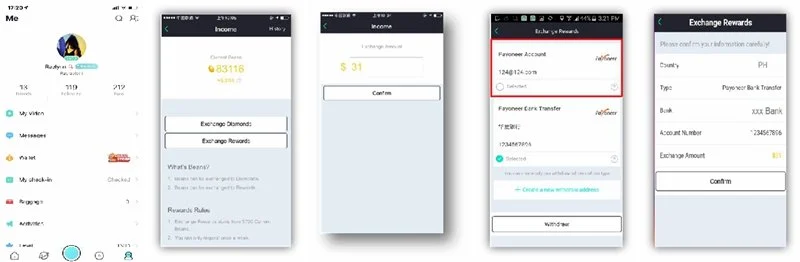
How to Withdraw Earnings to Payoneer
Step 1: Open BIGO LIVE and tap your Profile icon.
Step 2: Navigate to Wallet → Beans → Exchange Rewards.
Step 3: Enter the amount you would like to withdraw.
Step 4: Select your approved Payoneer account as the withdrawal destination.
Step 5: Review the details and submit your withdrawal request.
Step 6: Wait for BIGO LIVE to process the request. Processing times may vary depending on your region and payment provider.
How to Set Up a Payoneer Account
Step 1: Visit Payoneer.com and select Sign Up.
Step 2: Choose the account type that best fits your needs (typically Individual for creators and freelancers).
Step 3: Complete the registration process by entering your personal information, contact details, and payment information.
Step 4: Verify your identity and submit any requested documentation.
Step 5: Wait for Payoneer to review and approve your application. Approval times may vary depending on your country, account type, and verification requirements.
Step 6: Once your account is approved, you can link it as a withdrawal method within BIGO LIVE, if available in your region.
Important: Payoneer account requirements, verification procedures, and approval times may change. Always refer to the latest instructions provided by Payoneer during the registration process

Are There Any Withdrawal Fees?
Withdrawal fees, currency conversion fees, and payment processing charges may vary depending on your selected payment method, country, and BIGO LIVE’s current policies. Before submitting a withdrawal request, review the latest fee information displayed within the BIGO LIVE app and your payment provider’s terms.
How Much Are BIGO Beans Worth?
The value of BIGO Beans and the exchange rate used for withdrawals are determined by BIGO LIVE and may change over time. To view the most current exchange information, please refer to the Wallet or Exchange Rewards section within the BIGO LIVE app.
Are There Withdrawal Limits?
Minimum withdrawal amounts, maximum withdrawal limits, and withdrawal frequency may vary based on your account status, region, and BIGO LIVE’s current policies. Please review the latest withdrawal requirements within the app before submitting a request.
How Long Does It Take to Receive My Payment?
Processing times can vary depending on your withdrawal method, region, verification status, and the amount being withdrawn. Most withdrawal requests are processed within a few business days, although some transactions may require additional review and take longer.
What Should I Do If I Have a Withdrawal Issue?
If you experience issues with a withdrawal request, payment method, or account verification, you may:
✓ Contact BIGO LIVE Support through the app.
✓ Reach out to your agency representative for guidance and assistance.
✓ Review your payment information to ensure all details are accurate and up to date.
Growing your earnings on BIGO LIVE starts with creating engaging content and building a loyal audience.
Focus on consistency, audience engagement, and developing your unique style. The more value you provide to your viewers, the greater your opportunities to grow your community and increase your earning potential over time.
Not a Bigo Live Host yet? Become one today!